CK has large water areas Matcha can explore. I’ve had trouble getting them right. I’ve tried a few different assets. The best solution I’ve found is Stylized Water 2 (SW2) with the underwater extension from Staggart Creations. Easy to use, with a bunch o’ nice options.
It’s also good at detecting whether your rendering pipeline is set up right. I appreciate the work Staggart did. Makes my life easier.
There’s an issue, though. When working on CK, sometimes the editor turns gray. I can’t see any GameObjects. It looks like this:

After much googling and hair loss, I found a solution: disable Opaque Texture in the render asset.
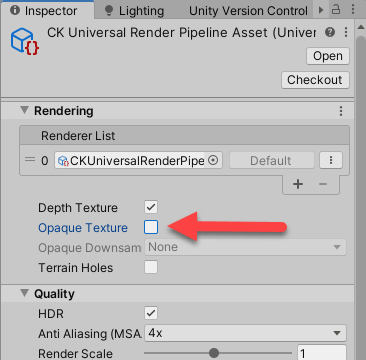
This is not a Staggart problem; it’s a Unity problem.
But… Stylized Water 2 says:
The OPAQUE TEXTURE is used for the refraction effect, and is required when it is enabled.
Well, poop. How does that affect the look, especially underwater? Refraction would seem like a thing that would matter underwater, right?
In the test game here, having Opaque Texture on didn’t cause the editor to flake out. It may be the gray issue is an interaction effect, that is, it only happens when Opaque Texture is on, and some other feature is on as well. So it’s possible the solutions explored here won’t generalize to CK.
Onward!
This post documents experiments in watering, with Stylized Water 2, the underwater extension, and opaqueless texture.
The usual note: I am an expert in neither Unity nor SW2. There are probably better ways to do things.
Seriously, I don’t know what I’m doing much of the time.