Another post to remind myself how I did something.
A game uses InVector’s 3rd person controller, the basic motions version (not the shooter, etc.). I wanted to give the player a menu like this:
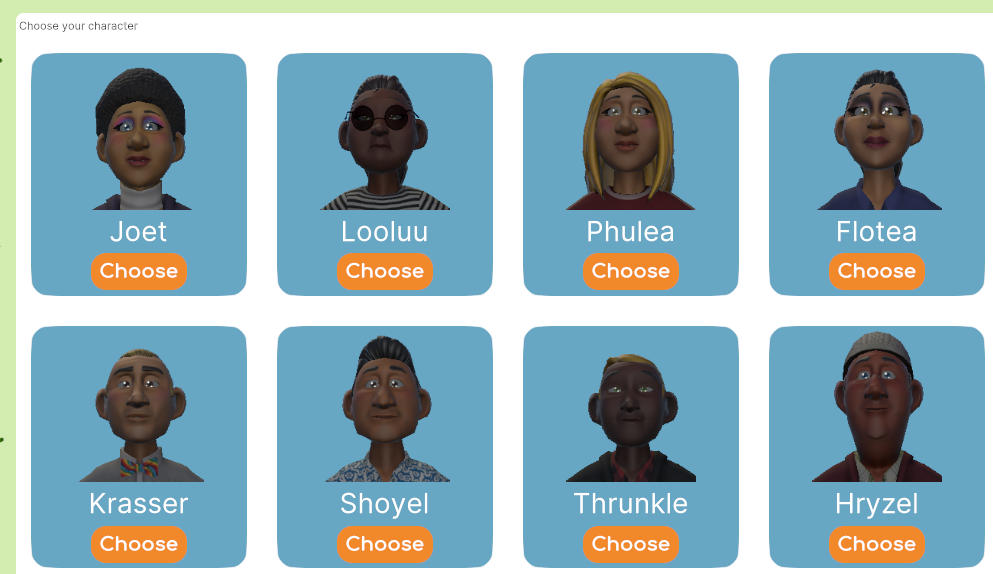
Click a character to use that one.
I had a hard time getting it to work, much messing around. Here’s what I did. There are probably better ways.
First, I set up this:
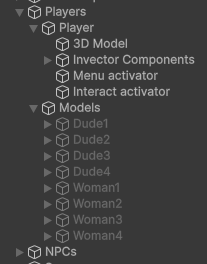
Player is the game object created by the InVector wizard. There’s something missing, though. 3D Model usually has the 3D model of the character as a child, you know, bones, skinned meshed renderers, like that. It’s missing.
When the player chooses a character, code reparents a model for the chosen character to 3D Model, and restarts the animator.
This class defines data for an entry in the menu and the associated model.
[Serializable]
public class CharacterModelDeets
{
	public string characterName;
	public bool isFemale;
	public Texture2D picture;
	public GameObject model;
}

[Tooltip("The models available for use by the player")]
public CharacterModelDeets[] characterModelDeetses;
model is Dude3, Woman2, whatevs.
This one…
[SerializeField]
[Tooltip("Where character models should be placed.")]
private GameObject characterModelParent;
… points to the 3D Model GO, the place where the models are reparented to.
This…
[SerializeField]
private Transform modelCache;
… is where models live when not in use. Models in the hierarchy above.
When the player chooses a character in the menu, code like this runs.
private int _currentCharacterModelNumber;

/// <summary>
/// Player choose a character.
/// </summary>
/// <param name="characterModelNumber">Character number, starts at 1.</param>
/// <param name="force">Force a change, even if char is the same as what is recorded as current.
/// Used in init.</param>
public void PlayerChoseCharacterModel(int characterModelNumber, bool force = false)
{
	// Exit if the model hasn't changed, unless forced.
	if (! force && characterModelNumber == _currentCharacterModelNumber)
	{
		return;
	}
	// Turn off the old model.
	characterModelDeetses[_currentCharacterModelNumber - 1].model.SetActive(false);
	_currentCharacterModelNumber = characterModelNumber;
	// Move the old model back to the place models not in use live.
	// They like it there. Air con, snacks, games...
	if (characterModelParent.transform.childCount > 0)
	{
		Transform firstKid = characterModelParent.transform.GetChild(0);
		firstKid.parent = modelCache;
	}
	// Parent the new model to InVector's controller.
	characterModelDeetses[characterModelNumber - 1].model.transform.parent = characterModelParent.transform;
	// Init location and rotation.
	characterModelDeetses[characterModelNumber - 1].model.transform.localPosition = Vector3.zero;
	characterModelDeetses[characterModelNumber - 1].model.transform.localRotation = Quaternion.identity;
	// Turn it on, baby.
	characterModelDeetses[characterModelNumber - 1].model.SetActive(true);
	// Restart the animator.
	PlayerController playerController = Utilities.GetKnowerOfThings().playerController;
	Animator animator = playerController.GetComponent<Animator>();
	animator.enabled = false;
	StartCoroutine(nameof(RestartAnimator));
}

/// <summary>
/// Restart the animator to get the character to work.
/// </summary>
/// <returns></returns>
private IEnumerator RestartAnimator()
{
	yield return new WaitForEndOfFrame();
	PlayerController playerController = Utilities.GetKnowerOfThings().playerController;
	Animator animator = playerController.GetComponent<Animator>();
	animator.enabled = true;
	animator.Rebind();
}
It may not be necessary to do all of these things, but it works. I tried variants, like calling Rebind without waiting for the end of frame, but no joy.
NB: I don’t know why this works with InVector’s controller, but it does. For me. At the moment. Until it breaks. Again.