This has been a pain. Maybe I have it right this time. Probably not.
You have a third-person with interactable objects close together.
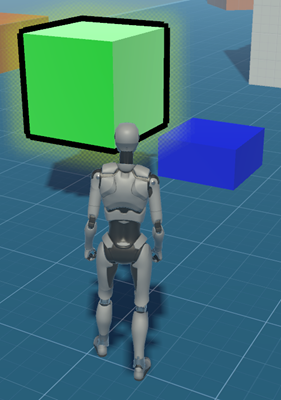
The character walks up to one, and it highlights, showing it is ready to interact. Only one object should be interactable at a time. But which one, if several are nearby?
You also want to let the character face a little off to the side of an interactable, and still have it selected. I’ll call this the fuzzy selection issue. Several objects could be fuzzily available.
There’s a also problem with verticality in a 3rd person game. The character looks straight ahead; there’s no up-and-down head control as with a first-person. Objects that are slightly above or below the line of sight should still be selectable.
Here’s the setup for a selectable:
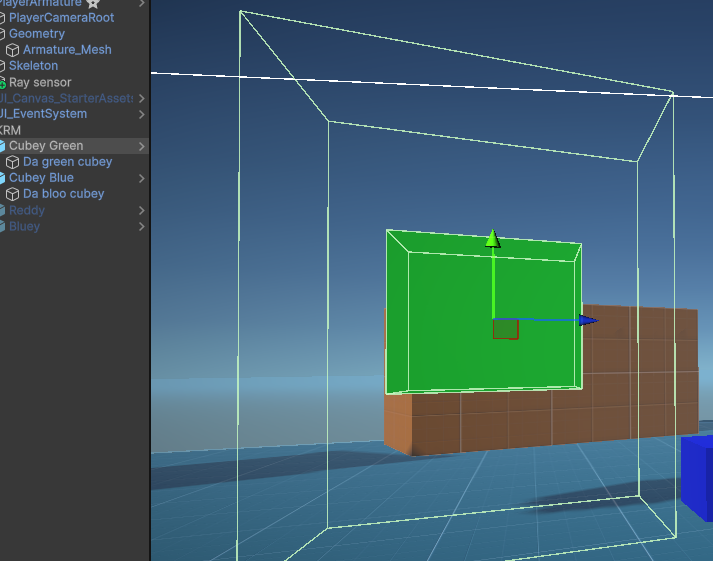
The rendered cube, called Da green cubey, is a child of a containing object called Cubey green. Both the container and the cube have colliders. The cube has a regular physics collider that blocks the character from walking through it. Its container has a larger trigger collider. The larger collider defines the volume for detection.
A ray is cast from the character; I used SensorToolkit 2. If the ray hits the container’s trigger collider, the cube is interactable. It’s a candidate for selection. That helps with fuzzy selection, since the character does not have to face the visible object directly for it to be selected.
The container, Cubey Green, is on the layer FF detectable. The ray only detects objects on this layer. The inner cube, Da green cubey, is not on the layer FF detectable, so is not detected. Only the container is.
The height of the container’s collider can be increased for small GOs, to deal with the verticality issue. Notice the green cube is floating, and the container’s collider is tall.
The cube has a highlighter component; I used Highlight Plus. Its container has a simple script to turn the highlighter on and off.
Let’s take a look at the character. It’s our old friend Kyle from Unity’s third-person starter assets. It has a child object handling interactable sensing.
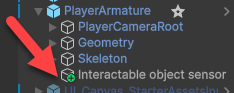
It has a ray sensor component that has to be set up just right.
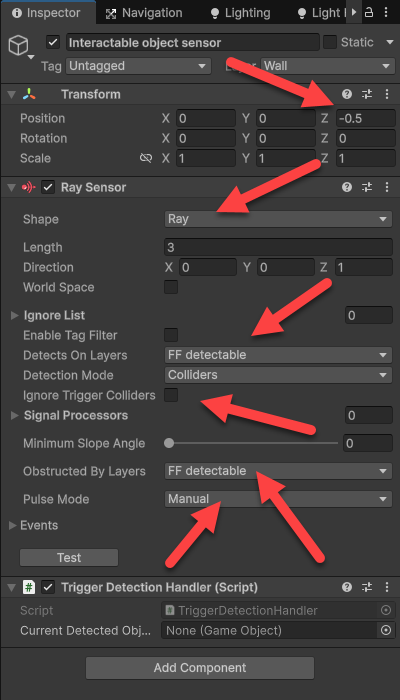
Note the sensor is placed a half meter behind the character. Otherwise, the sensor loses detection of the interactable with the character gets very close to the object, like touching it. I don’t know why.
The sensor is a ray. I tried other shapes, like a box, in the hopes that would deal with the fuzzy selection problem. Didn’t work. I did something wrong, but I don’t know what. So, ray it is.
The ray only detects objects on the FF detectable layer. It detects trigger colliders.
Pulse mode: manual means the sensor does not update itself. That’s in code. The sensor does not trigger any events itself, either.
Here is the code for the trigger detection handler component on the character:
public class ColliderDetectionHandler : MonoBehaviour
{
  private RaySensor _raySensor;
  public GameObject currentDetectedObject = null;

  private void Awake()
  {
    _raySensor = GetComponent<RaySensor>();
  }

  private void Update()
  {
    _raySensor.Pulse();
    // Get the closest detected thing if there is one.
    GameObject nearestDetection = _raySensor.GetNearestDetection();
    // Was anything detected?
    if (nearestDetection != null)
    {
      // Detected something.
      // Was something already registered as detected?
      if (currentDetectedObject != null)
      {
        // Something was. Undetect it.
        currentDetectedObject.GetComponent<Detectable>().ShowDetected(false);
      }
      currentDetectedObject = nearestDetection;
      currentDetectedObject.GetComponent<Detectable>().ShowDetected(true);
    }
    else
    {
      // Nothing is detected now.
      if (currentDetectedObject != null)
      {
        // Something was. Undetect it.
        currentDetectedObject.GetComponent<Detectable>().ShowDetected(false);
        currentDetectedObject = null;
      }
    }
  }
}
Update() pulses the sensor, and looks for anything detected. It picks the closest one if there are multiples. A better approach would be to detect the GO with the smallest angle to the ray, but this seems to work OK.
There’s a GetComponent call in Update(). Not optimal, but it only gets called if there’s a change in detection, which should be a frame or two per second at most if the player is running around. So I’m going to leave it.