Another note to self about moving focus around. As usual, I don’t know whether I know what I am doing here.
There is a main menu:
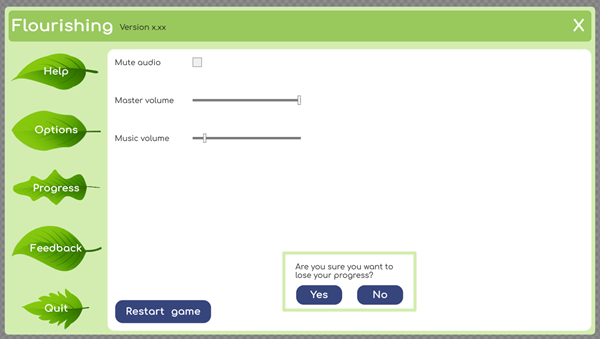
Buttons on the left choose which pane to show. They are the pane selectors (PS). Some panes have controls that can take focus, like options. Some panes just have elements like text that do not take the focus.
All panes and the PSs are part of the same UI toolkit document. There is a maximum of one focused element in the document.
The MainMenuController (MC) manages the pane-switching buttons and the close control in the upper right.
Each pane has a controller (PC) descended from BaseMenuPaneController (BPC). PCs manages focus inside its pane.
There is always one pane showing. The PS for the pane has a current-pane style. Call it the active pane (AP).
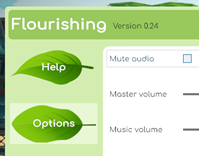
I’ll just talk about the keyboard here. Assume gamepad mappings as well.
The MC and each PC has a focus order, a list of controls from first to last.
Goals
1. Move focus on nav keys. How it moves depends on the keys pressed and the most recently focused element (MRFE).
2. Activate an element on submit. Submit is Enter and space. Activating an element gives it the focus.
Nav keys: Forward, back, up, down, left and right. On the keyboard, forward is tab, back is shift+tab. Up is W and the up arrow key. Down is S and the down arrow key. Left and right are what you think.
Why are left and right separate from back and forward? When the MRFE is a slider, left/right affect the slider’s value, not the focus.
Here are rules for focus.
When the menu shows, show the most recent AP, and give its PS the selected style. Set the focus to (1) the child control in the pane (like a slider) that has the focus most recently, or (2) the first child control if there the pane is shown for the first time, or (3) the PS button if the pane has no focusable children.
When the MRFE is on the main menu, up/down moves to the prior/next element in the focus order. Left is the same as back. Forward/submit changes the AP to the pane matching the MRFE. If the pane has focusable controls, focus moves into the pane to the first focusable.
When the MRFE is the close button on the upper-right of the menu, submit closes. Left/right/up/down/forward/back move the focus.
When the focus is in a pane, which it can only be if the pane has focusable controls, moving forward from the MRFE moves to the next focusable control in the pane, unless the MRFE is the last in the focus order. Then the focus passes back to the MC to place the focus on the PS for the pane. When the MRFE is the first focusable in a pane and nav back is used, move back to the MC’s PS.
When the focus is in a pane, down is the same as nav forward, and up is nav back. Left and right depend on the MRFE. If the MRFE is a slider or something else that can absorb the event, it does so. Otherwise, the keys are treated as nav forward and nav back.
When a control is clicked on or submitted, it gets the focus.
Implementation
Each PC knows its own focusables. It makes a focusable list during init. BPC can’t know; each PC does its own.
MC has its own focus list, too.
Forward/back/left/right/up/down are monitored by MC and every PC. Every one first checks to see if the MRFE is one of its own (its focusable list). If not, it ignores the event.
When MC’s AP changes, the pane is sent a you-got-focus.
Each PC gets a you-got-focus message from MC. It decides what to do. It can decline to take it if it has no focusable elements, put the focus on the most recent MRFE (what it was then the pane lost currency), or on the first control if there is no MRFE. Most (all?) of this can be implemented in BPC.
When a new AP is selected, MC: changes AP variable, hides all other panes, shows the pane, marks the right PS as selected, gives PS focus, and sends the PC you-got-focus. If the PC has no focusables, focus will remain on the PS.
Each control on a PC monitors click and change events. If it gets one, it grabs the focus, and tells its PC it is the new MRFE.
PCs monitor nav events (forward/back/left/right/up/down). They look at the MRFE to decide what to do.
PC Forward: change focus to next in focus order list after MRFE, unless MRFE is the last on the list. Then send focus to the pane’s PS in the MC.
PC Backward: change focus to next in focus order list after MRFE, unless MRFE is the last on the list. Then send focus to the pane’s PS in the MC.
PC Up/down: like forward and back.
PC Left/right: if MRFE is a slider, change value. Others, treat as forward/back.
PC click on a non-control: nothing changes.
Here are the rules again organized differently. The strange font is because for my WordPress install the list element was messed up in Astra in Gutenberg at the time of writing.
When the MRFE is…
Main menu:
  You-got-focus: Set focus to MRFE
  PS button:
    Forward: Make PS's pane the current page.
               - Reset other PS's look to default
               - Change PS's look to current
               - Tell the new pane it is current.
               - remember the new current pane.
    Back: Same as Up.
    Up: Same as Down but in reverse.
    Down:
      MRFE is the last element in the focus order list:
        Move focus to first in the list.
      Otherwise:
        Move focus to the next in the list.
    Left: Same as Up.
    Right: Same as Forward.
    Activate: Same as Forward.
  Close window button:
    Forward: Same as PS button Down.
    Back: Same as PS button Back.
    Up: Same as Back.
    Down: Same as PS button Down.
    Left: Same as Back.
    Right: Same as Forward.
    Activate: Close window.
Menu pane without focusable childen:
    You-got-focus: Nothing.
Menu pane with focusable childen:
    You-got-focus:
      Set focus to MRFE.
    Child focusable controls:
	Forward:
          Child is last in focus order list:
            Set MRFE to first in list (Note 1).
            Tell main menu you-got-focus.
          Otherwise:
            Move focus forward.
	Back: Same as Forward but in reverse (Note 2).
	Up: Same as Back.
	Down: Same as Forward.
	Left:
           Slider: Change slider value, leave focus alone.
           Button, toggle: Same as Back.
	Right: Same as Left but in reverse.
	Activate: Give this control the focus.
Note 1: So that when the user moves focus forward again, MP gives the right control the focus.
Note 2: When Back moves focus out of an MP, another immediate Back moves the focus up the PS button list. Maybe not what the user expected?