Another note to self. This should have been obvious to me, but it wasn’t. Here’s a critter with a box collider that sticks out on Z:
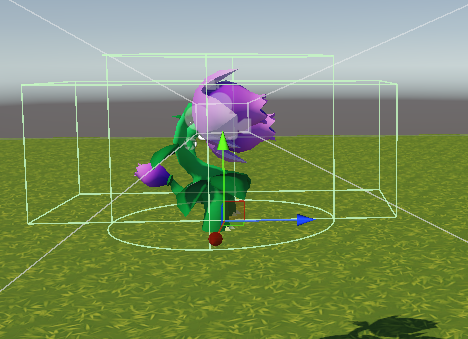
If navigating up a slope, the collider will catch on the ground, and stop the critter from moving. The collider can be quite small in Z, but still cause the same problem.
The solution? One way is to mess with collider size and shape. Here’s a cylinder collider whose bottom ends where the bottom of the feet are:
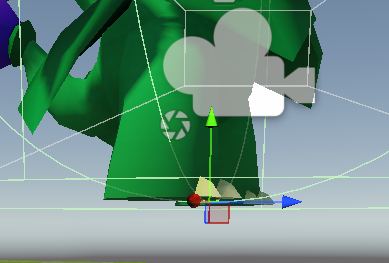
That worked for the part of the terrain I tried it in, but would it work over the entire terrain? Not even sure how to check that.
A better solution is to turn off collisions between the critter’s collider and the ground. Put the ground on a layer called, maybe, Ground. Put the critter on a layer called Creature, or something. Then in Physics in the project settings:
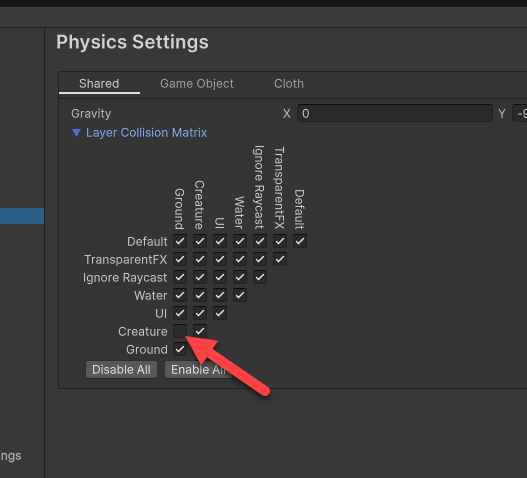
Turn it off. No more collisions with the ground, but still collisions with buildings, trees, etc.
What if you want to detect ground collisions, e.g., when falling to the ground? One solution: make a child object on the critter. Make the child not on the Creature layer. Add a trigger collider, maybe a small one extending slightly below the feet.
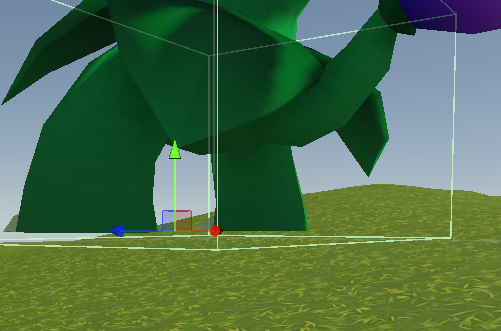
OnTriggerEnter/Exit seemed to work to detect leaving and hitting the ground, without being triggered when walking up a slope. I don’t know whether there would be cases where the front of the critter was above the ground when heading down a steep slope, triggering the collision when the ground flattened out. This might not happen if the creature’s nav maximum slope was lowish, but I’m not sure.
Another choice is to do ray casting, but I don’t see the advantage.