I want to add custom input to the animal controller, to allow menu control, and to take over interaction with objects with custom logic. I don’t know if I’m doing this right. I suspect not.
Menu
Press Esc, Tab or gamepad start, the character stops and starts idling. It won’t move. The menu can show.
Some keys have different meanings when the menu is showing. E.g., space is jump when the character is moving, but next-item when the menu is showing.
Press Esc, Tab or gamepad start again, the menu goes away, and the character starts moving again.
Steps:
Add to Malbers Inputs
Add to the action map thing for the new input system, mapping keys to events.
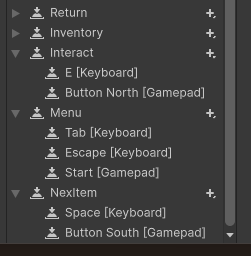
NextItem and Jump use the same keys.
Tell MInput Link about the events
MInput Link is a component on the GO with the animal controller. It’s on the same GO in the prefabs, anyway.
Two things here. First, press a button to tell Linky to reread the items in the action map:
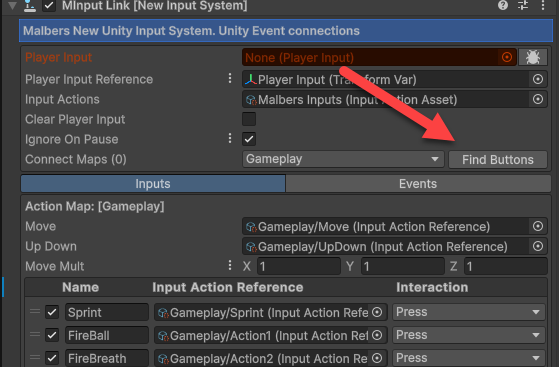
Now your new events will be on the list:
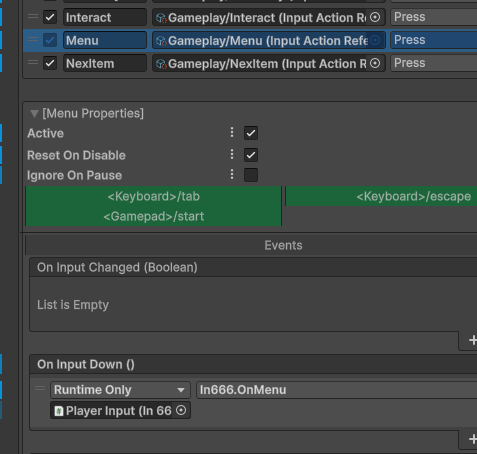
Do the draggy droppy to call a public method on a monobehavior class you make.
Stopping the animal
Not done, though. I want the animal to stop moving and enter the idle state when the menu appears. One approach is to put the animal in idle, disable all other states, and lock movement.
public void OnMenu()
{
  if (! _isMenuOpen)
  {
    _isMenuOpen = true;
    animalController.State_Force(0);
    foreach (State state in animalController.states)
    {
      if (state.ID.ID != 0)
      {
        animalController.State_Disable(state.ID);
      }
    }
    animalController.LockMovement = true;
    Debug.Log("Show the menu")
  }
  else
  {
    _isMenuOpen = false;
    foreach (State state in animalController.states)
    {
      if (state.ID.ID != 0)
      {
        animalController.State_Enable(state.ID);
      }
    }
    animalController.LockMovement = false;
    Debug.Log("Hide the menu");
  }
}
This is probably not the best way to do it, but it works.
Having space do something different when the menu is shown is…
public void OnNextItem()
{
  if (_isMenuOpen)
  {
    Debug.Log("Next item");
  }
}
One problem I had is the animal was slowly strafing left when idling, but only when the menu was showing. I don’t know why. My slimy solution was to turn off strafing for the state:
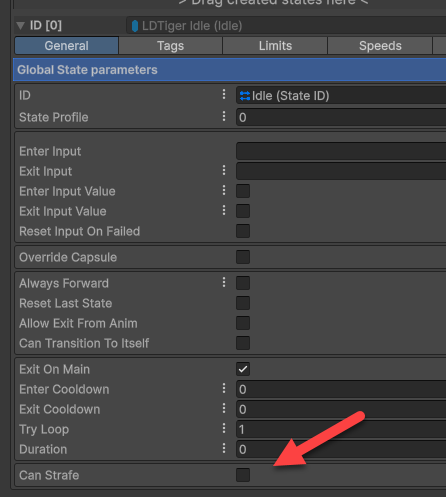
Errata: The strafing happened in a test project, not in a real one. I don’t know why.
Interacting with objects during game play
The other thing was to press E or gamepad north to interact with a GO when close enough. Some AC prefabs already have interact defined by MInput Link. I imagine you can just hijack that.
My animal didn’t, so I just added it to the Malbers action map, to MInput Link’s table, and Bob was my uncle. No, I didn’t have an uncle, AFAIK.